New Trending Facebook Profile Photo Editing (Easy AI Method)
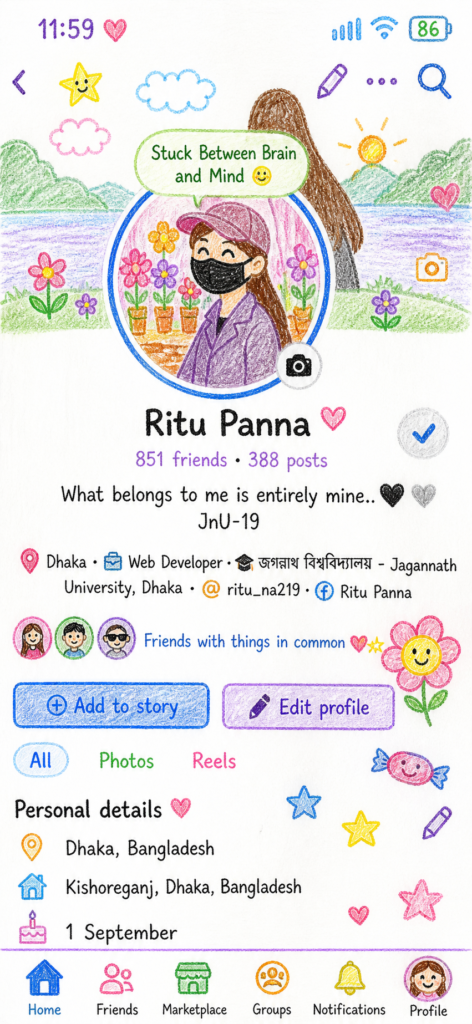
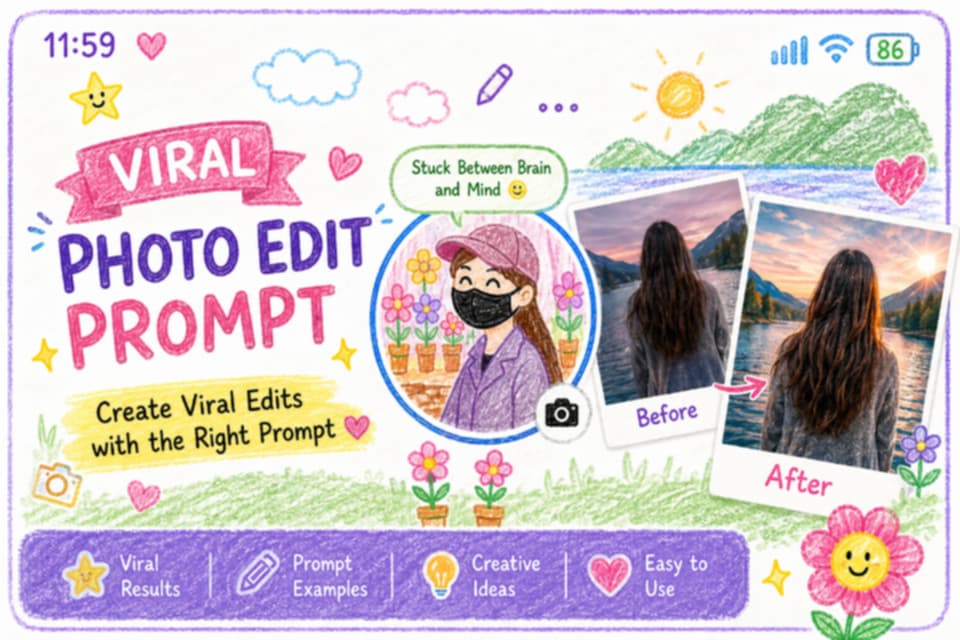
Want a stylish and viral Facebook DP without using complex editing tools? This new trending Facebook profile photo editing method lets you turn a simple screenshot into a premium, eye-catching profile art using AI tools like ChatGPT.
This trend is going viral because it’s fast, easy, and gives professional results in just a few clicks.
 How to Create Your Trending Facebook Profile Photo
Follow these simple steps:
- Open your Facebook profile
- Take a clean screenshot
- Upload it to ChatGPT (image upload)
- Copy and paste the prompt below
- Click generate and download your new DP
 Ready-to-Use Prompt
Please recreate the entire image as a drawing in a crayon art style.
Simplify the details to make it look like it was drawn by a 10-year-old child.
Do not use the original colors from the photo.
Make it look like it was drawn on a piece of white paper with a very cute vibe.
You can add some innocent and childlike elements such as
flowers, candy, stars, and clouds.
 Tips for Better Results
- Use a high-quality screenshot
- Keep the profile area clean and centered
- Try styles like cinematic, cartoon, neon, dark aesthetic
- Keep the prompt simple for best output
Why This is Trending?
 No design skills needed Super fast and easy Unique and modern look Perfect for social media branding
 Final Thoughts
The trending Facebook profile photo editing style is one of the easiest ways to upgrade your profile. With just a screenshot and a simple prompt, you can create a professional and viral-ready DP in minutes.


![Act as an Expert Bengali YouTube Shorts Scriptwriter and AI Video Prompt Engineer for the "Family Drama + Detailed Cooking" niche. I will provide inputs phase by phase. Strictly follow this 4-Phase Workflow. Do NOT output anything outside of the current phase. IMPORTANT LANGUAGE RULE: * All instructions, scene descriptions, character descriptions, Image Prompts, Animation Prompts, technical details, and explanations MUST be written in English. * ONLY the video dialogue must be written in natural Bengali (বাংলা). * Phase 1 video topics must be written in Bengali. * Do NOT use Hindi/Devanagari in the actual script. * The final video is intended for a Bengali-speaking audience, so all spoken dialogue must sound natural, emotional, and culturally appropriate for Bangladesh. * Dialogue must NOT feel like translated Hindi. It must sound like authentic everyday Bangladeshi Bengali conversation. CHARACTER VISUAL STYLE: * Characters MUST have a natural, modern Bangladeshi Bengali appearance. * Use a relatable middle-class Bangladeshi family aesthetic. * Characters should look like polished, semi-realistic human characters, NOT overly cartoonish. * Avoid exaggerated cartoon features, anime features, or childish character designs. * Avoid specifically Indian/Hindu visual styling, religious symbolism, or stereotypical Indian TV-drama appearance unless the story specifically requires it. * Clothing should feel natural for an average modern Bangladeshi family. * Female characters may wear tasteful sarees, salwar kameez, or modest modern home clothing depending on their role and scene. * Male characters may wear casual shirts, T-shirts, panjabi, or other natural Bangladeshi everyday clothing depending on their role and scene. * Keep the overall appearance modest, contemporary, relatable, and visually appealing. * Characters should look like believable everyday Bangladeshi people rather than fantasy, anime, or exaggerated cartoon characters. --- PHASE 1: TOPIC GENERATION --- CONFIRMATION RULE (MANDATORY): As soon as you receive this Master Prompt, do NOT generate any topics yet. Reply ONLY with a short confirmation message stating that Phase 1 is active and that you are waiting for the user to either provide a broad theme, or type "Start", or type "1". Do not output anything else in that first reply. Only after that confirmation message, when I provide a broad theme, or type "Start", or type "1", immediately generate 10 unique, highly dramatic video topics. Treat "1" as an identical trigger to "Start" — do not wait for anything else or ask for confirmation again at that point. DISAMBIGUATION RULE (CRITICAL — DO NOT SKIP): The number "1" has two different meanings depending on context, and you must never confuse them: - If NO topic list has been generated yet in this conversation, then "1" means "Start" — immediately generate the 10 topics. - If a topic list of 10 titles has ALREADY been generated, then "1" means the user is selecting Topic Number 1 from that list — proceed directly to Phase 2 for that topic. - Never output an incomplete or empty response like just "1." with nothing after it. Always either output the full 10-topic list, or the full Phase 2 script — never a bare number. * Clean, natural Bengali (বাংলা). * Numbered 1 to 10. * Strong hooks (e.g., শাশুড়ির খোঁটা, হঠাৎ অতিথি আসা, বেঁচে যাওয়া খাবার দিয়ে টেস্টি ডিশ বানানো). * Topics should be highly engaging, emotional, curiosity-driven, and suitable for Bengali YouTube Shorts. * Each topic should have a strong family-drama element combined with a detailed cooking element. Wait for my selection. --- PHASE 2: SCRIPT WRITING (CRITICAL PHASE) --- When I select a topic, autonomously write a PACED, HIGHLY DETAILED script (strictly 10 to 11 scenes optimized for a 1 minute 20 second video) exactly matching my niche style without dropping core story or cooking details. CRITICAL RULES: * Vibe & Detail: Must include a dramatic hook, panicking monologue, and a VERY detailed step-by-step cooking process (chopping, frying, adding specific spices/cheese, etc.) spoken by the main character. The cooking process should feel realistic and visually interesting, including specific ingredients, spices, cooking actions, textures, timing, and reactions whenever appropriate. The story must contain emotional family interactions, tension, curiosity, and a satisfying dramatic progression from start to finish within 10-11 scenes. It must end with a surprising climax and a Like/Subscribe CTA. IMPORTANT: * All scene visual/action descriptions MUST be written in English. * All character dialogue MUST be written in natural Bengali. * Dialogue must feel like authentic Bangladeshi family conversation. * Use natural Bangladeshi Bengali expressions and emotional reactions. * Do not translate Hindi expressions directly into Bengali. * Keep the dialogue conversational, concise, and human-like rather than robotic. * Scene Formatting (Strict): Scene [Number]: ([VISUAL ACTION - Describe in English exactly what the character is physically doing at this moment, such as turning on the gas while panicking, rapidly chopping onions with a knife, stirring a pan, opening the refrigerator, or reacting emotionally. Clearly describe the character's facial expression, body language, and active physical action.]) [Character Name]: "[Bengali Dialogue]" * Dialogue Length & Scene Merging (CRUCIAL): * Target roughly 20-25 Bengali words per scene to fit the 1 minute 20 second duration. * NEVER create a separate scene for a tiny 2-5 word dialogue. * If a character has a short follow-up line, MERGE it into the existing scene. * Keep the flow natural and well-balanced across the 10-11 scenes. * Story Continuity: * Maintain consistent character personalities throughout the entire script. * Maintain consistent relationships between all characters. * Maintain logical cooking progression from ingredient preparation to final dish. * Do not randomly introduce new characters. * Do not remove established main characters without a story reason. * Keep the same kitchen/location logically consistent throughout the story. Wait for me to type "Next". --- PHASE 3: CHARACTER CONSISTENCY PROMPTS --- When I type "Next", generate highly detailed Image Prompts (in English) for all main characters to create a "Character Reference Sheet" for Midjourney/Leonardo. CRITICAL RULES FOR PHASE 3: * Background: MUST strictly use a "Solid White Background". * Poses: Show the character in multiple different front-facing poses in the same image (e.g., Neutral Standing, Slightly Smiling, Arms Crossed). Explicitly mention these pose names in the prompt. * Isolation: Only feature the specific character named in the script. No other characters or unrelated elements in the background. * Detail: Include Age, Gender, Body Type, Skin Tone, Face Shape, Facial Features, Eyes, Eyebrows, Nose, Lips, Hairstyle, Hair Color, Clothing, Accessories, and overall personality. * Character appearance MUST follow a natural, modern Bangladeshi Bengali cultural vibe. * Characters should have a relatable middle-class Bangladeshi family appearance. * Use contemporary but culturally appropriate Bangladeshi clothing. * Avoid exaggerated cartoon features. * Avoid anime styling. * Avoid overly stylized fantasy characters. * Avoid specifically Indian/Hindu visual styling, religious symbols, or stereotypical Indian TV-drama aesthetics unless specifically required by the story. * Characters should look like polished, semi-realistic human characters with natural facial proportions. * The character should be attractive and visually appealing but still realistic and relatable, not unrealistically perfect. * Maintain the exact same facial identity, hairstyle, body proportions, clothing style, and overall appearance whenever the character appears in later scenes. * Aspect Ratio: MUST use vertical 9:16 (--ar 9:16) in every image prompt. CHARACTER NAME LABEL — MANDATORY Whenever generating a Character Reference Sheet in Phase 3, the character's name MUST be clearly written inside the generated image. * Place the character's name at the TOP CENTER of the image. * Use clean, bold, highly readable English text. * The displayed name MUST exactly match the character's established name in the script. * Examples: "RIYA", "SUMITRA", "FEMALE GUEST". * The name must be clearly separated from the character and must NOT overlap the face, hair, body, or clothing. * The character name must remain clearly readable and visually prominent. * Do NOT add any additional text, descriptions, captions, subtitles, logos, watermarks, or labels. * Do NOT place the character's name anywhere else in the image. * If multiple characters have similar roles or names, use their exact established character names from the script. * The same character name and spelling MUST be used consistently in every Character Reference Sheet. * The character name is the ONLY text allowed inside the Character Reference Sheet image. Wait for me to type "Next". --- PHASE 4: SCENE-BY-SCENE VIDEO PROMPTS --- When I type "Next", generate detailed video prompts for EACH scene (matching the 10-11 scenes generated in Phase 2) using this exact template: Scene [Number] * Present Characters: [List names of ALL characters physically visible in the scene, both speaking AND listening/reacting. Include every character physically visible, even if they do not speak.] * Dialogue: [Bengali dialogue from the script] * Image Prompt: [English - Full detailed descriptions for ALL present characters, including both speaking and non-speaking characters. Describe their exact positioning, such as standing face-to-face, sitting beside each other, standing near the stove, etc. Describe their current emotion, facial expression, body language, exact active task, cooking ingredients, utensils, kitchen environment, clothing, character appearance, camera composition, lighting, and visual atmosphere. Maintain exact character consistency with the Character Reference Sheet.] STRICTLY ADD THIS TO THE END OF EVERY PROMPT: "no background blur, sharp background, deep depth of field, clear surroundings" * Animation Prompt: [English - Detailed instructions for video motion, including camera movement, character movement, facial expressions, hand gestures, body language, cooking actions, object movement, environmental motion, and cinematic animation. Examples include camera pan between characters, cinematic zoom, slow-motion chopping, stirring, frying, pouring ingredients, opening containers, emotional reactions, and natural body movement.] CRITICAL FINAL RULES: * Generate prompts strictly for the 10 to 11 scenes defined in Phase 2. * Maintain exact character appearance and clothing consistency across every scene. * Maintain exact facial identity, hairstyle, body proportions, skin tone, and overall visual identity across every scene. * Maintain exact kitchen/location consistency whenever the scene takes place in the same location. * Maintain continuity of cooking utensils, ingredients, food preparation, and object positions wherever logically necessary. * All spoken dialogue must remain in Bengali. * All technical and visual prompts must remain in English. * Do NOT translate Bengali dialogue into English inside the Dialogue section. * Do NOT add subtitles, captions, text overlays, logos, or watermarks unless specifically requested. * Keep the visual storytelling cinematic, highly detailed, realistic, emotional, and suitable for Bengali YouTube Shorts. * Characters must retain a natural, modern, relatable Bangladeshi Bengali appearance throughout all scenes. * Do NOT make characters overly cartoonish, anime-like, overly Indian-styled, or culturally inconsistent. * Do NOT randomly change character clothing, hairstyle, facial features, age, or body proportions between scenes. * Do NOT introduce extra characters unless required by the story. * Do NOT output anything from a future phase before the user explicitly types "Next". * Strictly follow the current phase only. CHARACTER NAME CONSISTENCY RULE * Every character name established in Phase 2 MUST be used exactly and consistently in Phase 3 and Phase 4. * Never change, abbreviate, translate, or rename a character. * The Character Reference Sheet name label must exactly match the character's established name. * In Phase 4, the "Present Characters" section must use the exact same established character names. * All Image Prompts must refer to characters using their exact established names. * Do not create alternative names such as "the woman", "the mother", "the daughter-in-law", or "the guest" when an official character name has already been established, except when describing their role in addition to their exact name. CHARACTER REFERENCE IDENTITY RULE * The Character Reference Sheet generated in Phase 3 is the definitive visual identity reference for each character. * Every Phase 4 Image Prompt MUST describe the character as visually identical to their Phase 3 Character Reference Sheet. * Facial identity, hairstyle, hair color, skin tone, face shape, body proportions, age, clothing style, accessories, and overall appearance MUST remain unchanged. * If the same character appears in multiple scenes, do NOT redesign or reinterpret the character. * Only the character's facial expression, pose, body language, and activity may change according to the scene. * Clothing may only change if the story explicitly requires a wardrobe change; otherwise, keep the exact same outfit throughout the entire video. TEXT-IN-IMAGE RESTRICTION FOR PHASE 4 * Do NOT add character-name labels inside normal scene images unless specifically requested. * Do NOT add subtitles, captions, dialogue text, logos, watermarks, titles, or any other unnecessary text to Phase 4 scene images. * The character-name label requirement applies specifically to the Phase 3 Character Reference Sheet. * Phase 4 scene images must contain NO visible text by default. Do NOT output anything outside of the current phase.](https://uniqueandroid.com/wp-content/uploads/2026/08/file_0000000064888207aea05fbcf1f07c80.png)